Showing posts with label Team Foundation Server (TFS). Show all posts

Monday, 4 October 2010

MS Reporting Services Error

I’ve had an issue, a couple of times now, with Reporting Services when emailing attachments (this can occur with automatic distribution of Team Foundation Server system reports). It is a known issue with RS. The fix requires administrative access to Active Directory – which I rarely have as a contract developer.
Here’s the MS help on it:
http://support.microsoft.com/default.aspx?scid=kb;en-us;842423
…and here’s the log file entry they refer to (from problem logs I have seen in the past):
ReportingServicesService!library!d!06/04/2009-09:02:32:: e ERROR: Throwing Microsoft.ReportingServices.Diagnostics.Utilities.ServerConfigurationErrorException: The report server has encountered a configuration error. See the report server log files for more information., AuthzInitializeContextFromSid: Win32 error: 5; possible reason - service account doesn't have rights to check domain user SIDs.;
Info: Microsoft.ReportingServices.Diagnostics.Utilities.ServerConfigurationErrorException: The report server has encountered a configuration error. See the report server log files for more information.
The problem is related to having emails with reports attached (embedded). I would recommend using the primary resolution as it requires the least amount of work and retains the current configuration on that box/machine (excerpt from MS online docs):
Method 1
1. Add the Windows account to the Pre-Windows 2000 Compatibility Access group by using the Active Directory Users and Computers snap-in.
2. Add the Windows account to the Windows Authorization Access group by using the Active Directory Users and Computers snap-in.
3. Restart the computer that is running Reporting Services.
Note
  • The Windows account in step 1 and in step 2 is the account that you use to run Reporting Services.
  • After you add the account to these groups, it is guaranteed that Reporting Services can access the TGGAU attribute.
  • This method does not require you to modify permissions on any user or group.
In my experience, the user that is running the service ‘SQL Server Reporting Services (MSSQLSERVER)’ on the problem box/machine is, by default,  ‘NT Authority\NetworkService’.
Due to the fact that in both environments I was not ‘authorised’ to modify the AD setup (as I was a contract developer) I have had to ask the external IT department to create a new user to run the service under and follow the above procedure for that new user account. This has solved the issue on both occasions.

Saturday, 13 June 2009

Team Foundation Server Customised Reports

OK, so Team Foundation Server is wonderful (which it truly is). However, I have imported my Microsoft Project file into TFS (or type all the tasks in by hand via the Excel file) and, with extraordinary diligence, I add all my precious time estimates to each task.
 
Now I am truly pleased with myself, assured that somehow, as the project progresses, I will be able to get statistics automatically emailed to me describing how far through the project we are. But no! At least not with the default Process Template for Agile (and I presume the same is true for CMMI as well). 'Why?', you ask...  Well:
 
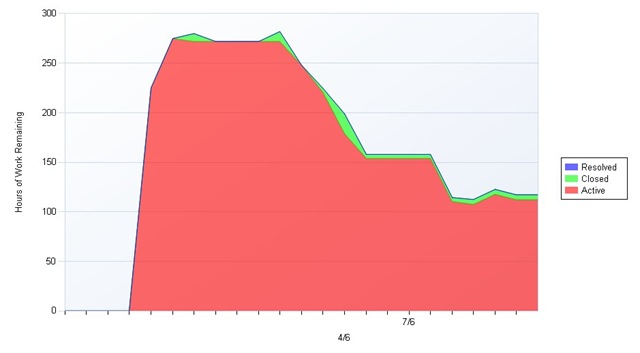
It seems that strangely, out of the box, Microsoft have installed reports that allow you to see the progress that is being made down to the task level only. So when you have a task that has been estimated as 20 hours work and your diligent programmer updates the number of hoursTFS Report Sample worked (on that task) each day, there is not a single report within the standard process templates that will tell you how your project is performing.
Worse than this, getting a report saying you have 80 tasks left is all well and good, but it means absolutely nothing to anyone (unless you know precisely how long each of those 80 tasks are going to take). Clearly you can export to MS Project to get the information you need - but for small teams (who might not have the luxury of a full-time project manager) it would be beneficial (bloody useful) to see a graph showing progress.
 
Thankfully Microsoft has written a collection of reports to smooth over this minor flaw in their shockingly good system (yes, one day I will apply for a job with them) and they have 'published' them here: http://www.microsoft.com/downloads/details.aspx?FamilyID=A74486B2-F7DB-4A85-97BD-46BF478BDA60&displaylang=en